

I went to San Francisco this weekend and met with my friend Will Eisley who works at Apple. Will and I have a pretty interesting history: we went to Pitt together, we both worked on the school newspaper and we share a love for design and technology. At one point, we started talking about AI. Will asked me a question that I thought I had an answer for:
“What should the interface for AI look like?”
I gave him my answer, it wasn’t a terrible answer, but the more I thought about it afterward the more I realized that I hadn’t really answered the question. I said I wanted something more visual. I talked about having a sort of puppet I could reach inside and interact with, that could also operate on its own. This was an incomplete answer.
I don’t want AI to just be an application that I open. I want it to be constantly present. It should be available when I need it, but it shouldn’t necessarily be in my face when I don’t. It should be able to see the things I’m working on, with permission, and understand the context of what I’m doing. And I should be able to grab it and bring it into whatever I’m working on. Currently the process is reversed and I have to feed the AI my work, that’s dumb.
What does it look like?
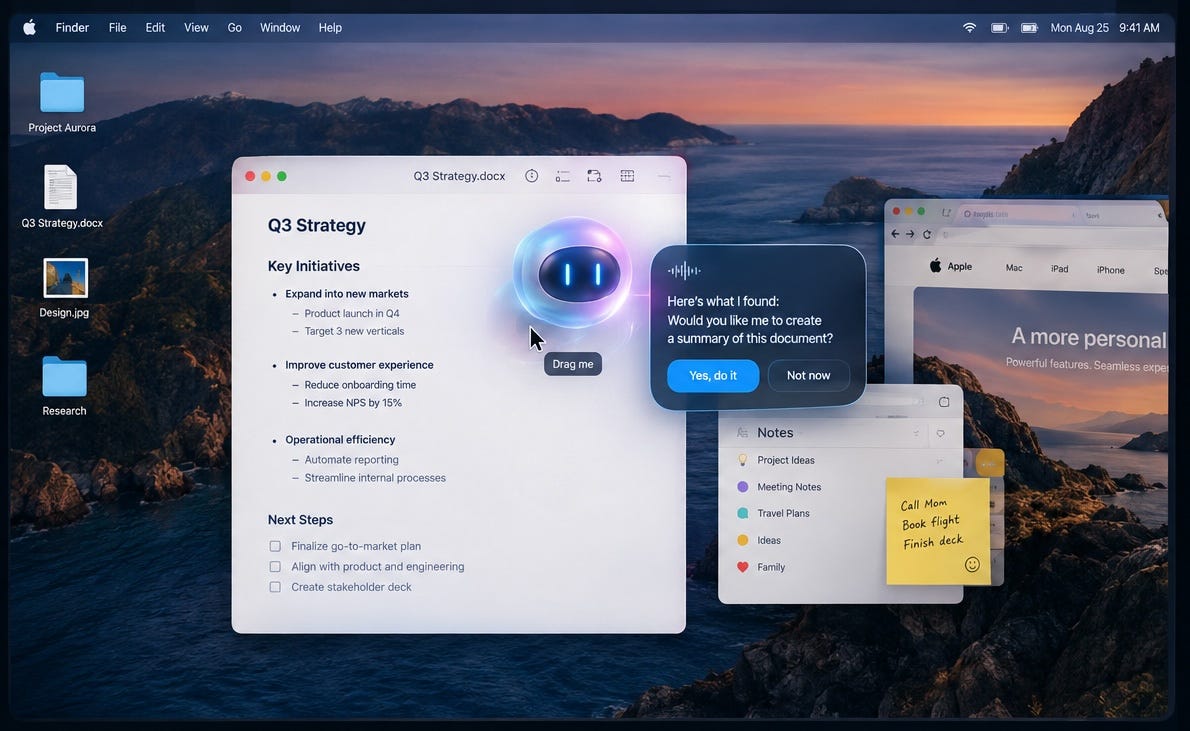
Imagine a little AI object living somewhere in your operating system. Not a giant chat window, not another application, not a text box demanding that you type a prompt into it. Something small, something visual. A little translucent object that floats above your desktop. Then you can grab it, you drag it around. You can drag it over the document you’re working on. You can drop it onto a spreadsheet. You can drag it over a folder. You can move it onto a browser window. You can put it next to your email. You can basically say, work with this.

That’s a very different interface than opening a chatbot and typing “Please analyze this document and give me a summary.” Instead, you grab your little AI and drop it on the document. It looks at the document. Then it says: “Do you want me to summarize this?” You say yes. Then you move the AI off to the side and keep working. Ten minutes later … beep beep … “Hey Mark. I’m finished.”
But what does it sound like?
AI is constantly doing things in the background. Thinking, Searching, Reading, Writing, Waiting. Running multiple tasks. Finishing something. Waiting for you. Why should all of that information have to be displayed as text?
This is where another old idea of mine comes in. Years ago, I had an idea for an operating system designed around music. The idea was actually for blind users. You would turn on the computer and it would play a particular piece of music. As the computer booted, the music would change. Once the computer was ready, you would hear a different music that told you the system was ready to accept commands. Different states of the computer would have different music or melodies or rhythms.
The computer could essentially tell you what it was doing without requiring you to look at it. I thought that was interesting then, and I think it’s even more interesting now. Imagine your AI has its own little musical identity. Not some obnoxious notification sound. Something more subtle. Maybe there’s a quiet ambient sound when it’s working. Maybe the sound changes when it’s waiting for you. Maybe there’s a little musical cue when it finishes something. Maybe it speaks with a subtle rhythmic pattern underneath its voice.
And that pattern belongs to your AI. You recognize it. You know it’s your computer talking to you before you even look at the screen. Not just any AI talking to you, YOUR AI! You can change it, you can give your AI a different voice. A different sound. A different personality.
You know it’s your computer talking to you before you even look at the screen. Not just any AI talking to you, YOUR AI! You can change it, you can give your AI a different voice. A different sound. A different personality.
Maybe the visual interface changes too. When it’s idle, it’s barely there. When it’s working, you can see something happening. Maybe there are little graphical patterns moving around it, almost like those old visualizers we used to watch in the 90s while listening to music, signaling the AI is thinking.
Where to start?
I really like Apple Notes, not because it’s revolutionary, but because it quietly does something that most applications still don’t do very well. I can put something into Notes on one device and it’s just there on my other devices. This can include - Text, Pictures, Documents, Audio Recordings, Drawings - little snippets of things that I don’t necessarily want to turn into a formal document. It’s basically a digital junk drawer.
I remember the old Mac had little Post-it-like notes that you could stick on your desktop. They were useful precisely because they weren’t applications. You didn’t have to open Microsoft Word. You didn’t have to create a document. You didn’t have to decide where to save the document. You just threw something onto the desktop and kept going. We need to start breaking out of the desktop metaphor we’ve been using for decades. The idea that you open an application, create a document, save the document, close the application and then go find the document later is a pretty rigid way of thinking about computing.
AI doesn’t need to work that way. Your information shouldn’t necessarily require applications. Your AI shouldn’t live inside an application either. It should live with you. I want my AI on my desktop, in my phone, in my AirPods, and in my car … not in a browser window. Right now I have to drag the document I’m working on into the AI, that whole process needs to flip around.
I can hear Steve Jobs say to his engineers “the ChatBot is great, now do the whole interaction without a single line of text.”